
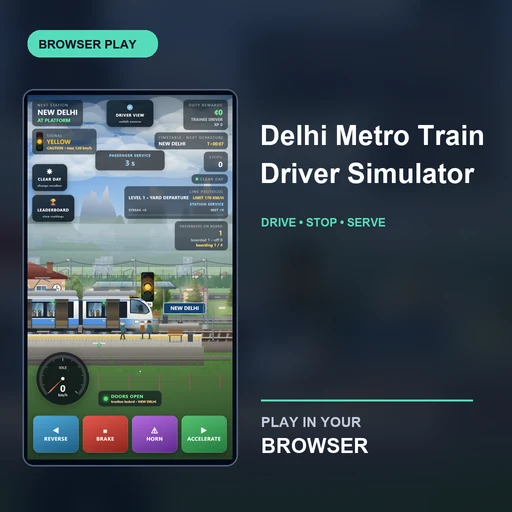
Delhi Metro Train Driver Simulator
Take the controls in Delhi Metro Train Driver Simulator. Watch signals, serve passengers, manage your speed, and aim for accurate station stops as you build your driver rank.
About Delhi Metro Train Driver Simulator
Play the Delhi Metro game in your browser
Start a duty and take responsibility for a passenger train. Delhi Metro Train Driver Simulator asks you to watch the line ahead, control your speed, stop at stations, and wait for boarding to finish before moving on. Easy Driving Assist is enabled in the current version to make early stops more forgiving.
Read the signals and plan your stop
The driving display shows the next station, signal state, speed limit, and departure timing. Accelerating is only part of the job: a smooth approach gives you time to brake and line up with the platform. Use the station information to plan ahead rather than chasing maximum speed.
Complete passenger service
At a platform, the game handles the passenger and door sequence. Open doors lock traction, so holding the accelerator will not override an unfinished stop. Watch the service countdown and door status, then leave after the train is ready. Accurate stops and completed duties contribute to your driver progression.
Change your view of the journey
Switch between the available camera views, try the weather control, and use the horn from the driving panel. This is a stylized browser driving game with station and duty systems; the route and timing should be treated as part of the game rather than a live transport guide.
How to Play Delhi Metro Train Driver Simulator
- Select START DUTY to begin a driving shift.
- Wait for passenger service to finish and the doors to close. Traction is locked while doors are open.
- Hold ACCELERATE to move forward, BRAKE to slow down, or REVERSE when you need to back up. Use HORN when needed.
- Watch the next-station panel, signal color, speed limit, and departure timer. Ease off early as you approach a platform.
- Stop in the marked station area and allow the automatic passenger and door sequence to finish before departing.
- Switch the camera or weather using the on-screen controls.
Desktop: W / Up / Right accelerates; S / Down / Space brakes; A / Left / R reverses; C switches camera; T changes weather; H sounds the horn. Click inside the game first. Touch players can hold the labeled driving buttons.
Delhi Metro Train Driver Simulator FAQ
How do I start the Delhi Metro game?
Choose START DUTY. The first platform introduces passenger service, the departure timer, and the driving controls. Wait for the doors to close before trying to accelerate away.
Why will my train not move?
Check the door status first. During boarding or alighting, the display can show DOORS OPEN and TRACTION LOCKED. Wait for the automatic service sequence to finish, then hold ACCELERATE.
How do I brake and reverse?
Hold BRAKE on the screen, or use S, Down, or Space on a keyboard. Use the REVERSE control, A, Left, or R to back up. Slow down early so you have time to align with a station.
Do I open and close the doors myself?
The current duty mode runs the passenger and door sequence automatically when the train is correctly stopped for service. Watch the boarding countdown and the door indicator before departing.
Can I switch camera or weather?
Yes. Use the camera and weather controls on the driving screen. On desktop, C changes the camera and T changes the weather; H sounds the horn.
Is this an official Delhi Metro route planner?
It is a playable train-driving simulator. Its stations, duties, weather, and timings are game systems. Use current transport information from the operator when planning a real journey.
Is it a racing game?
This version starts in passenger-duty mode. Its main tasks are driving, watching signals, stopping accurately, and completing station service. The controls and instructions on this page describe that mode.